Habib Afolabi
Case study01

Song from Screenshot

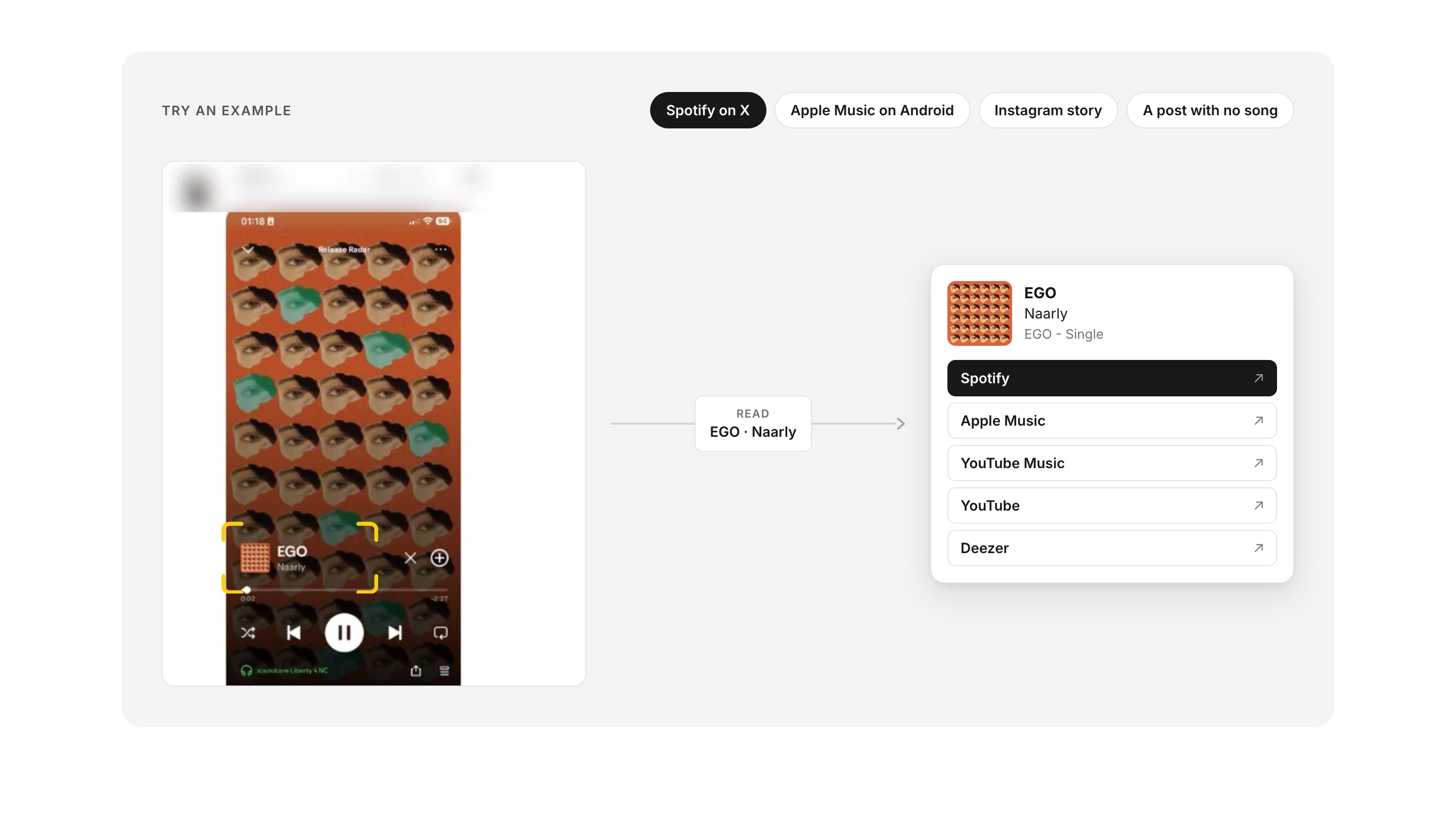
Send it a screenshot of a Spotify or Apple Music Now Playing screen and get links to the same song on every platform, or no link when it isn't sure. You host it yourself, so your screenshots go only to your own server.

The Song from Screenshot demo: a Spotify Now Playing screenshot shared on X, the title and artist read from it (EGO by Naarly), and a result card linking to Spotify, Apple Music, YouTube Music, YouTube and Deezer.
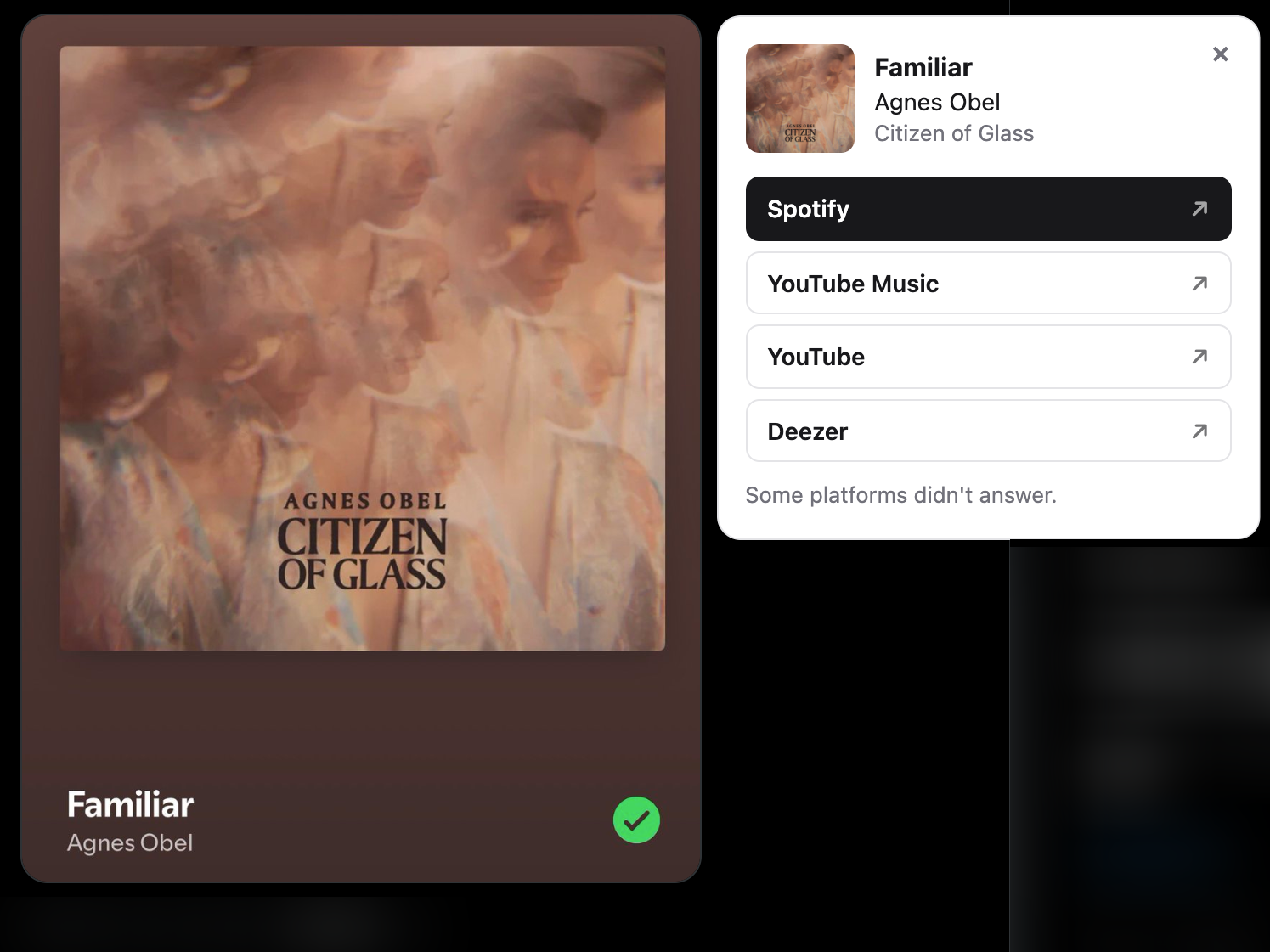
The Chrome extension on X: a card beside a post's Spotify screenshot shows Familiar by Agnes Obel, with links to Spotify, YouTube Music, YouTube and Deezer.
Chrome extension on X
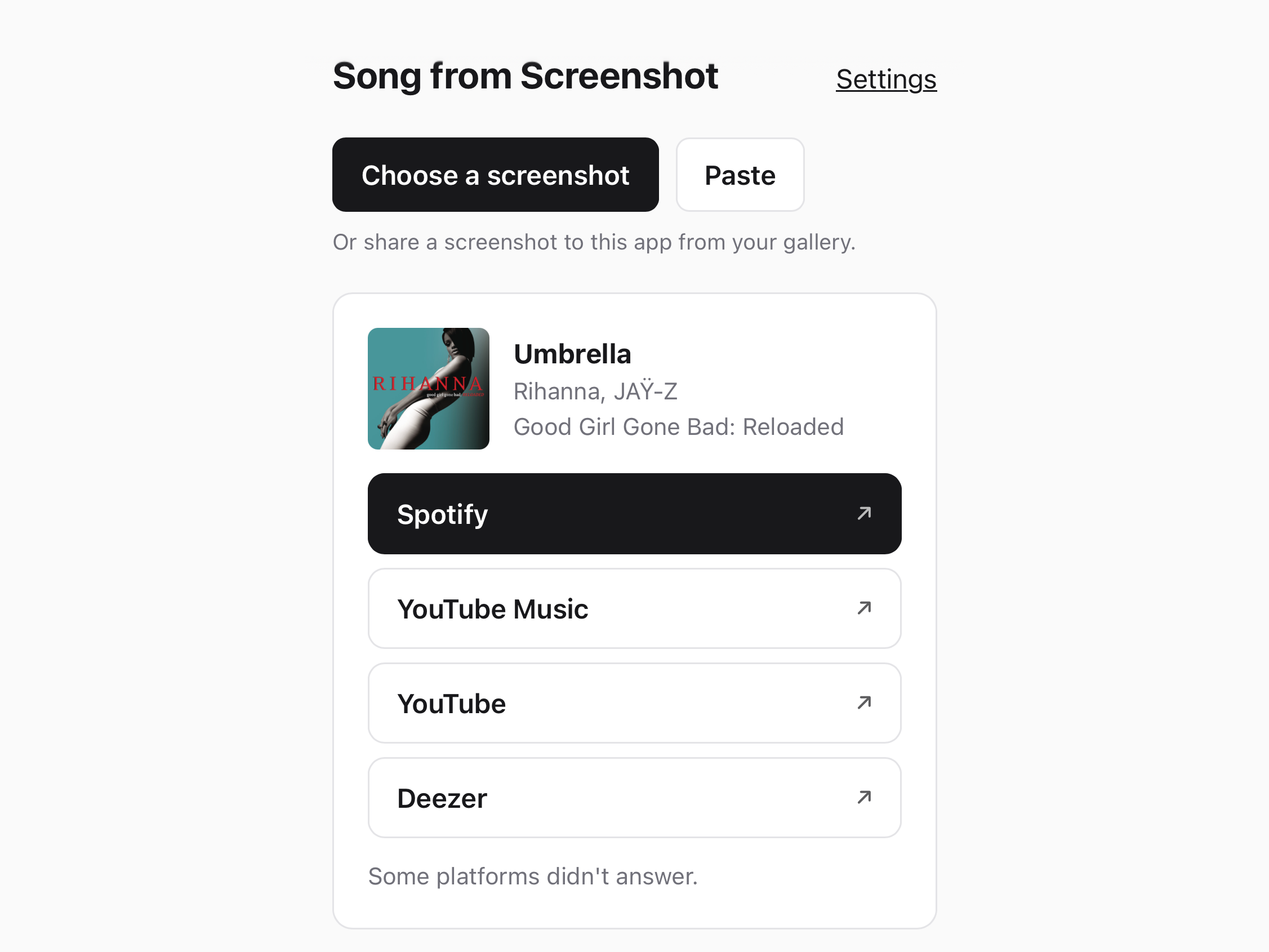
The phone app's result for Umbrella by Rihanna and JAY-Z, with Spotify first as the preferred platform, then YouTube Music, YouTube and Deezer.
Phone app
  • TypeScript
  • Cloudflare Workers
  • Hono
  • Workers KV
  • Claude API
  • Chrome extension
  • Vitest and Playwright

The problem

A lot of the music I love came from other people’s recommendations, so I’m always looking. I spend a lot of time on social media, and I noticed that people mostly share what they’re listening to as a screenshot: Spotify’s or Apple Music’s Now Playing screen, posted on X or in an Instagram story. I used to search for each song myself. At some point I decided to remove that step.

Song from Screenshot reads the screenshot and returns direct links to the song on Apple Music, Spotify, Deezer, YouTube and YouTube Music. It’s a small API on Cloudflare Workers, with three ways to reach it: a Chrome extension that adds a “Find song” button on X and Instagram, a phone app that Android can share screenshots to, and an iPhone Shortcut.

Each person deploys their own copy with their own keys, using a Deploy button or a setup script. Nobody else’s server sees your screenshots, and nobody else pays for your lookups. There are no analytics or third-party scripts, and the web app’s CSP enforces that.

A single function decides whether a platform’s result is the same song. The platform searches only supply candidates. A link appears only when the title and artist match, so remixes, covers, live versions and fan uploads are rejected. When Claude reads a song but nothing matches, the answer is uncertain, with Spotify and YouTube search links instead.

There’s a cost. A screenshot of a remix often comes back uncertain instead of linking the original. That’s the rule working: a confidently wrong song is worse than a search link.

Haiku first, one retry on Sonnet

Claude Haiku 5.5 reads each screenshot for about $0.0004. It sometimes misread small artist text on cropped screenshots. My options were looser match rules, which would bring wrong links back, or paying for Sonnet on every read. Instead, when no platform matches Haiku’s reading, Claude Sonnet 5.5 reads the screenshot once more, which brings that request to about 1¢.

Searching each platform directly

The plan was a single call to Odesli (song.link), which maps a song to every platform. Its keyless API started returning 401 PUBLIC_API_ACCESS_DEPRECATED, so the Worker now searches iTunes, Deezer, Spotify and YouTube in parallel, each with a 4-second timeout. If one platform fails, the response is marked partial and still carries the other links.

Two caches in Workers KV

One cache is keyed by the image’s hash and the other by title and artist, so a repeated screenshot or song skips Claude and the platforms. The song cache stores what the platforms returned, never the final answer, because how confident the answer is depends on that one reading of the screenshot.

A Shortcut for iPhone

iOS doesn’t let web apps receive shares. Android gets a real share target from the web app. On iPhone, a Shortcut converts the HEIC screenshot to JPEG, sends it to the Worker and opens the result in Safari.

Where it bit back

  • Odesli closed its free API on the day I approved the spec, which is why the Worker searches each platform itself.
  • A cache that hid links. The song cache first stored the final, confidence-adjusted answer. One low-confidence read of a song then hid its links from every confident read for the next day. Review caught it. The cache now stores the raw platform results, and the confidence rule runs on every request.
  • The iPhone Shortcut, debugged on a real phone with wrangler tail:
    • A Text action kept an invisible character, so Cloudflare answered with a 400.
    • Shortcuts’ URL encoding leaves ( alone, and iOS link detection stops there, so every title with brackets broke. The answer now travels as Base64.
    • Link detection gave up on long Base64 inside a Text action, so a URL action builds the address instead.
  • Images on X and Instagram. Both sites’ CSPs block the album-art hosts, so the extension passes artwork to its card as a data: URL. When a site won’t let the extension download an image, it captures the visible tab and crops the image out, allowing for the device pixel ratio.

Testing

  • The Worker’s tests run inside workerd, Cloudflare’s runtime. Claude, fetch and KV are passed in as arguments, so the tests use fake clients and recorded platform responses instead of network mocks.
  • The recorded Worker responses are typed against the API’s response type, so changing the contract fails the typecheck in both clients.
  • Playwright runs the extension in real Chromium. It reads the card’s closed shadow root through the DevTools protocol, and every test fails if anything contacts a host it shouldn’t. The phone app is tested against a real wrangler dev, so its headers and share fallback are tested as deployed.
  • I checked each new test by breaking the code on purpose, and several had been passing for the wrong reason. For example, the landing page tests told two demo examples apart only by title and artist, so swapping them still passed. They now check the number of links too.
  • A live test sends the real fixture screenshots to Claude and the platforms. It costs money, so it runs only when asked. The iPhone Shortcut, the Android share and the right-click flows were checked by hand on real devices.